

July shipped a mix — you can now grow the storage on your PostgreSQL databases, API keys landed with flexible expiration, and every deployment now records where it came from.
Good news for anyone running low on space: you can now resize the storage of your PostgreSQL services.
From the Runway CLI:
# show volumes
runway volume ls
...
# grow volume
runway volume set <volume-id> 15000
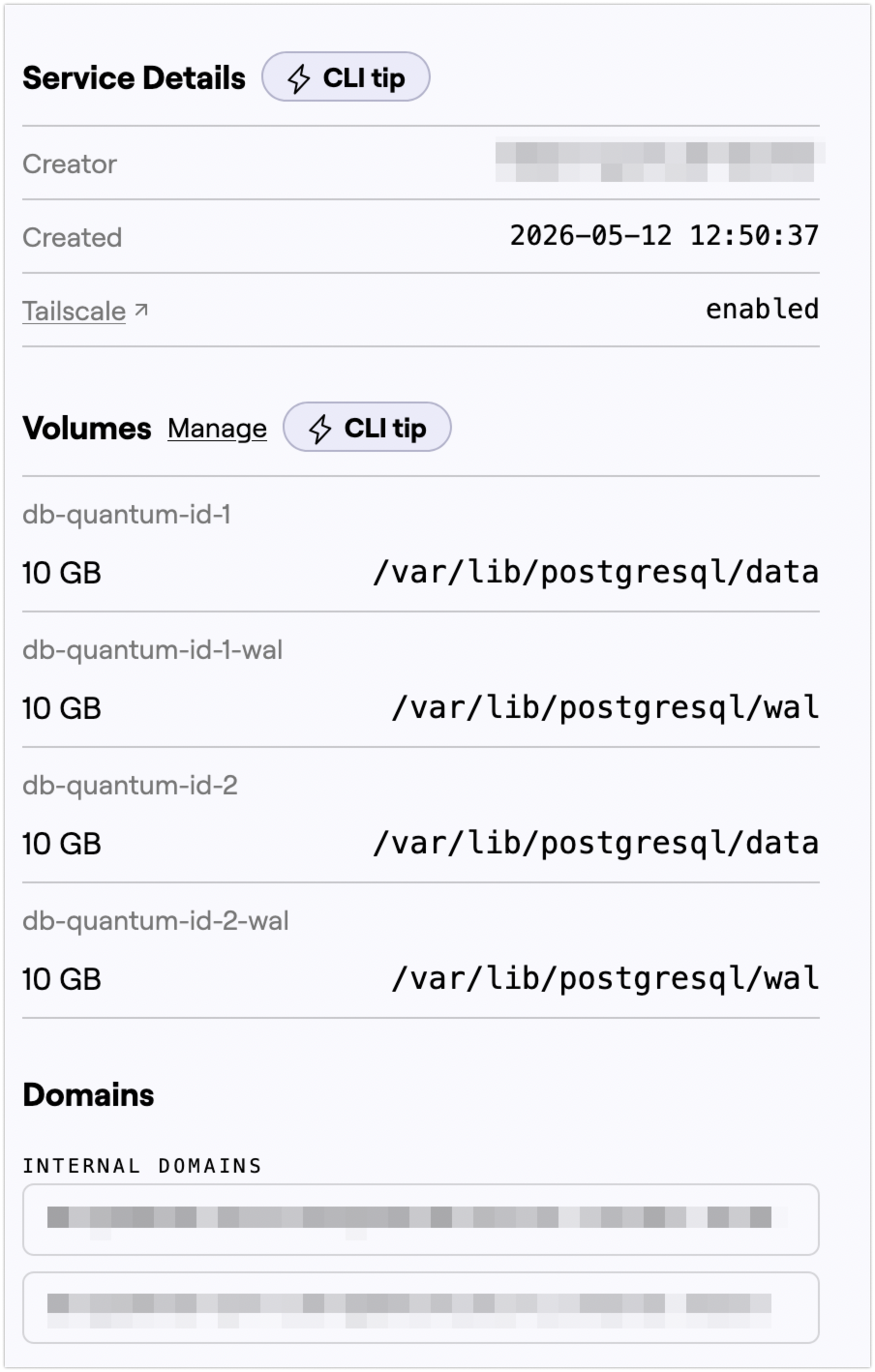 In the Runway UI, volumes now appear on the service page. The “manage” link takes you into the account section for the full view.
Resize is the only action for now, but we’re exploring custom volumes for Runway Apps — custom mount points and attach/detach, all managed in the same place.
Full management view:
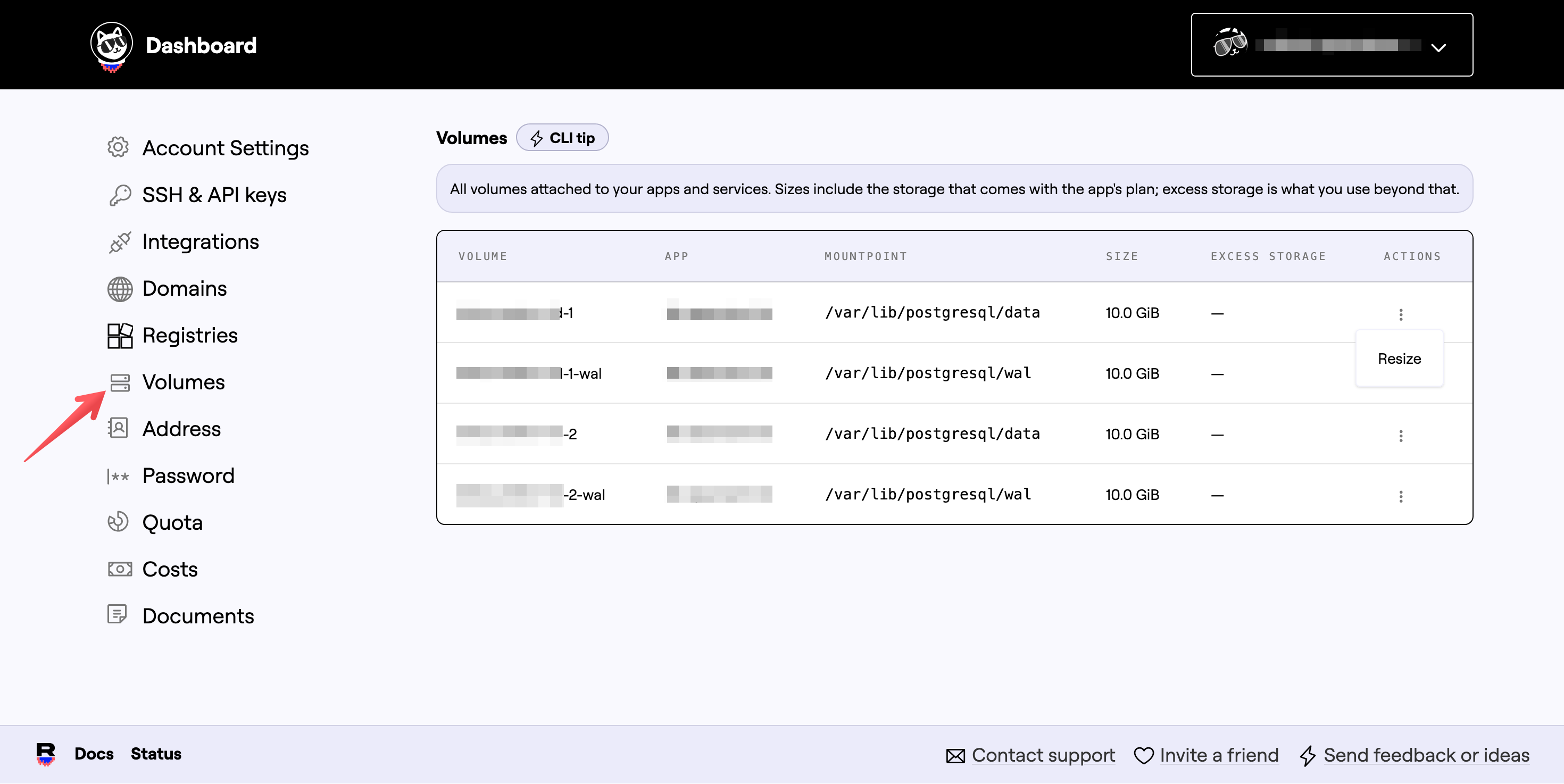
Growing a volume takes a bit of time, so the state you see in runway volume ls or the UI is eventually consistent while Runway expands the volume and refreshes the service. Sometimes services will failover and reboot as part of it, but that happens without interruption.
Storage expansion is available to service creators on Scale plans and above, as it incurs charges. The price is €0.50/GB/month (50 € cents).
Runway now supports API keys, valid for up to a year. Why bother?
Use them for CI/CD deployments instead of sharing your username and password. They’re also a good fit for MCP sessions — no timeout to worry about.
The key part is that expiration is flexible. Need to let another tool poke at your account for an hour? Set a one-hour expiration and forget about revoking it. Longer-lived integration? Set a year.
API keys are available in the Runway CLI:
# list all keys
runway api-key ls
     Name      Status       Created           Expires          Last Used
 setup-runway  ACTIVE   2026-07-24 10:25  2027-07-24 10:25  2026-07-24 10:53
 test-now      REVOKED  2026-07-20 14:43  2026-08-20 12:11  2026-07-20 15:14
 test-123      REVOKED  2026-07-20 14:17  2027-07-20 14:17  2026-07-20 14:19
 newtest       ACTIVE   2026-07-27 11:12  2026-07-27 12:12  never
 newtest       ACTIVE   2026-07-27 11:12  2026-07-28 11:12  never
 jkhjkhjkhjk   ACTIVE   2026-07-24 21:39  2026-07-24 22:39  never
Create a new key with a one-hour expiration:
# create a new key
runway api-key create new-key 1h
  ╭──╮
 ◜│  │◝
  ◯  ◯   Create API key "new-key" with expiration 1h. Is that okay?
  │  │╭
  │◟_◞│
  ╰───╯
api-key creation: done
  Name    Status       Created            Expires       Last Used
 new-key  ACTIVE  about a second ago  in about an hour  never

Secret (store it now - it will not be shown again):
runway_v1_XXX...
Revoke it:
# get the key-id
runway api-key ls --full
                Key ID                     Name      Status        Created            Expires          Last Used
 8352499a-fe0d-4a9d-af02-601a834ffd32  new-key       ACTIVE   about a minute ago  in 59 minutes     never
runway api-key revoke 8352499a-fe0d-4a9d-af02-601a834ffd32
  ╭──╮
 ◜│  │◝
  ◕  ◕   Revoking api-key 8352499a-fe0d-4a9d-af02-601a834ffd32. Is that okay?
  │  │╭
  │◟_◞│
  ╰───╯
api-key removal: done
Key management is also in the UI, in the same place as your SSH keys:
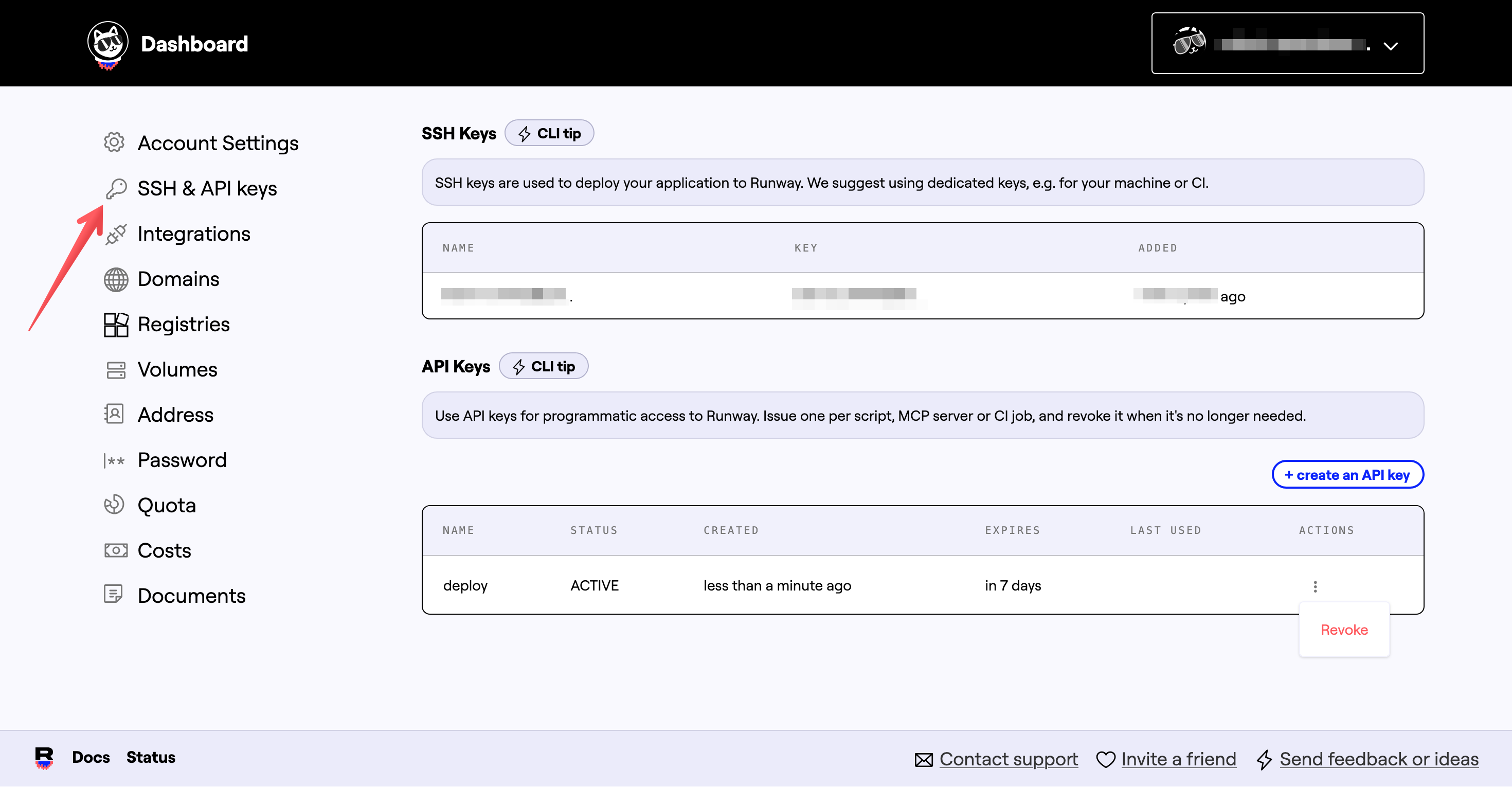
To use an API key from the CLI, sign in with it:
# temporarily disable history
set +o history
export RUNWAY_API_KEY=key...
set -o history
runway login
Or in CI with our GitHub Action - please star:
- uses: hostwithquantum/setup-runway@v0.6.0
  with:
    api-key: ${{ secrets.RUNWAY_API_KEY }}
Or with curl:
# temporarily disable history
set +o history
export RUNWAY_API_KEY=key...
set -o history
curl -H "X-Runway-Api-Key: ${RUNWAY_API_KEY}" \
  https://api.runway.horse/v3/apps
Every deployment now records where it came from — surfaced in both the CLI and the UI:
runway app ls
And in the UI:
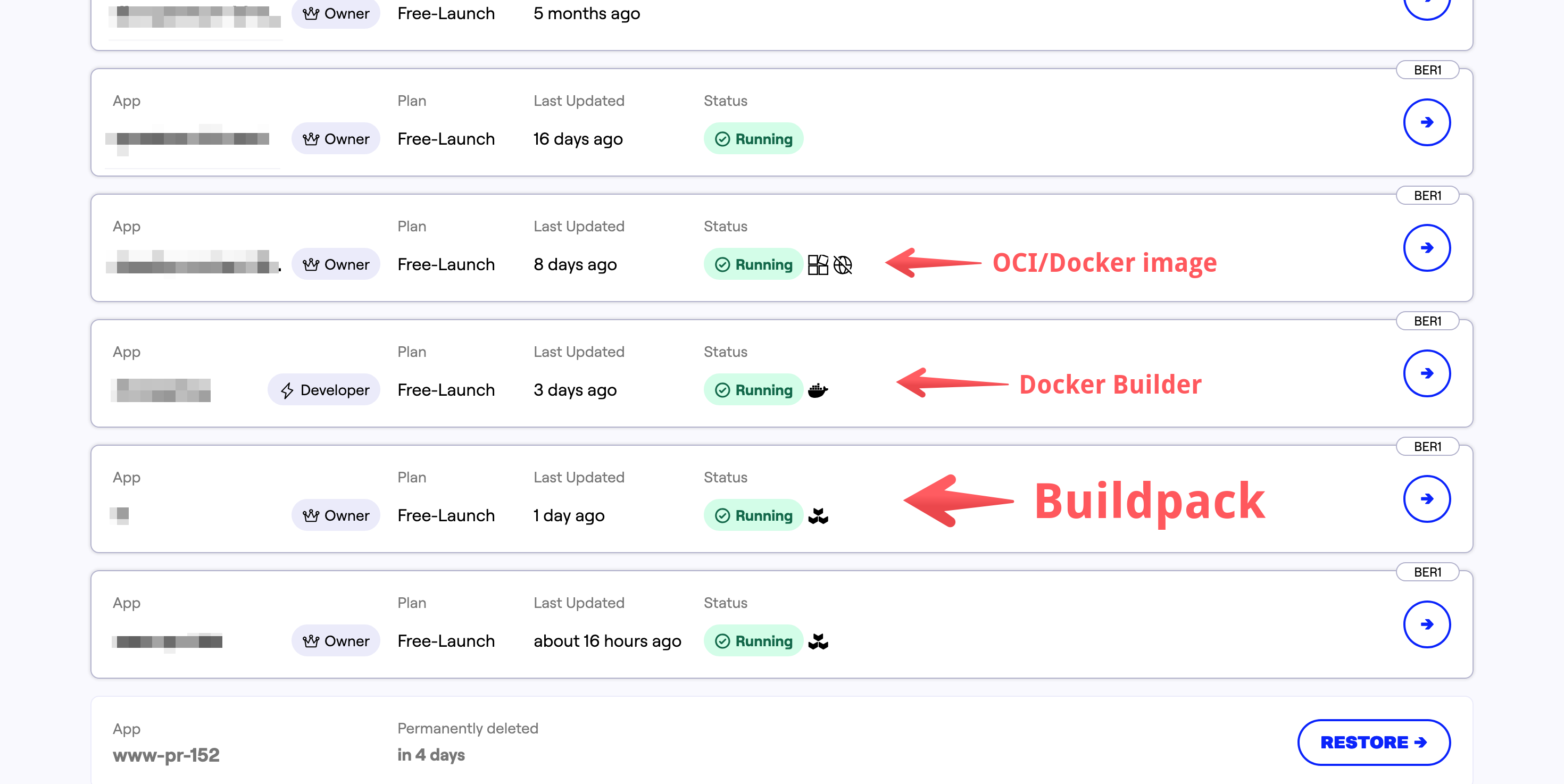
Aside from being a handy audit trail, the source records also carry SBOM information — we’re planning to use that for a couple of new features, and we might expose it via API too. :)
runway app exec gives you an interactive shell into your running Runway app processes. This month we improved the environment for apps built via our buildpacks (which is the majority).
For example, if you run a Node.js app, node and npm are now on your PATH — no more wrangling with the /layers/... directories to piece things together.
That makes ad-hoc tasks a lot easier. If you want to run something on a schedule (via GitHub Actions, say), runway app exec "node script.js" now just works.
Feedback matters — as anyone running a product or service will tell you. We’re often blind to the little things, so we appreciate every message a lot. Thanks to Andreas, Fabian, Henrik, and Sebastian for writing in. :)
On that note, a few small changes landed this month based on what you told us:
curl one-liner for installing the Runway CLI actually works on macOS/arm64 now, and the docs no longer trip over unquoted shell variables.runway app config complains before an app exists.runway app config set is now idempotent — a new release only rolls out when values actually change. Sorry about that!
That’s it for July. As always, give the new bits a spin and let us know what you think — and if you’re new here: Runway runs your apps and managed databases, hosted entirely in the EU.